
Hotel Lobby AI Video Generator
The staging is fixed and the pair is yours. Add two photos, pick the stage the motion should come from, and the panel takes the camera and the gestures from that stage's clip, keeps both faces, and films the shot the trend is built on.
5 models here will hold two photos and a reference clip in one run
What the Hotel Lobby AI trend is
It is a staging, not a model. Two people stand shoulder to shoulder against a flat orange wall, one microphone hangs on a cable between them, the camera is locked off at chest height, and the two of them keep a deadpan expression while making the same small hand gestures in time. In late September 2026 creators began running that staging through video models with their own two photos standing in for the performers, and the pairs people cast into it — pets, cartoon characters, friends, couples, athletes, film characters — are what turned it into one of the season's most-copied clips.
What a template like this fixes is the staging, and there are two ways to hand a staging to a video model: describe it, or show it. Describing it works — a prompt can ask for a locked-off camera and a pair of gestures — but the model then invents the specifics, so what comes back is a shot in that style rather than that shot. Showing it is what a reference clip is for: the model reads the camera and the choreography from the clip and the identity from your two photos, which is why the panel below asks for both, and why it holds the model to ones that can take a clip and two images at once.
The pair is the part you bring. That is the whole trade: the wall, the light, the microphone and the movement come from the reference clip, and the two faces come from your two photos.
One thing worth being clear about, because it is the difference between joining a trend and misusing one: this page names the trend because that is what the trend is called. It has no connection to the record the staging came from and it ships no audio from it — and the shot it makes is a duo in that style rather than a copy of anybody's video. The clips shown here are re-hosted so that the stages can be run at all, and each one is captioned as what it is; none of them is presented as a run made on this page.
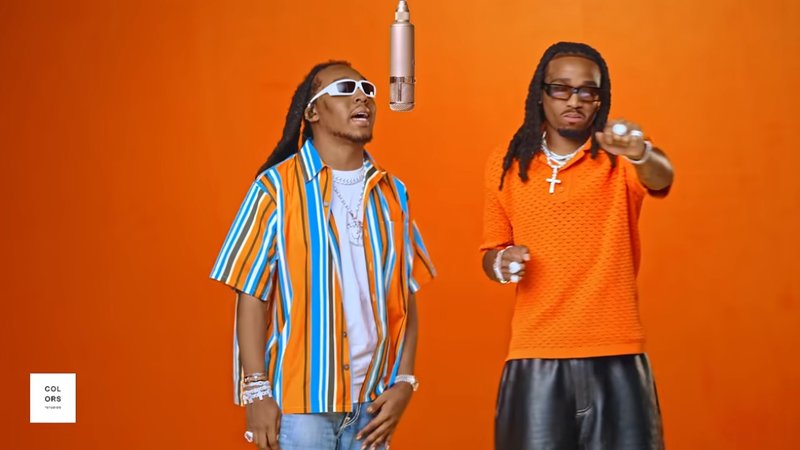
The stages this page runs in
Four backdrops, each with its own reference clip. The first is the trend's staging in two lengths, shot on a clip we generated for it; the other three are demo clips published by rapduo.ai, whose stage names this page borrows.
Three steps, all on this page
Nothing here sends you to a workbench to finish the job.
Add two photos
One photo per figure, previewed on this page. Nothing is uploaded until you are signed in — the panel keeps them locally until then.
Pick the stage
Each stage is a reference clip, and the clip is where the camera, the gestures and the backdrop come from — the difference between this template and a description of it. Hotel Lobby ships in two lengths, the others in one, and you can bring your own clip in place of any of them.
Generate, and watch it here
Keep or rewrite the prompt, choose the model and the resolution, then generate. The clip plays below the panel; reloading clears it, and the run stays in your video history.
What the panel gives you
Counted over the 5 models on this page that can shoot the template, not over the whole catalog.
2 photos and a clip
The panel takes 2 photos, one per figure, plus a reference clip for the motion. Generate stays closed until both photos are in; the clip is optional, and the panel says which of the two it is running when it is not there.
Up to 30 seconds
That is the longest single run the models here declare, and it is the ceiling: the panel does not stitch clips together or edit video, so one generation is the finished shot.
720p · 2K · 480p · 1080p · 4K
Between them the models here cover those tiers, and each one declares its own — the panel offers exactly those rather than one shared list.
Sound
2 of the models here put their own generated audio on every clip; the rest come back silent. Either way the trend's audio is yours to add where you post it.
Video Engine Capability Matrix
Different video models excel at different horizons — from 4K realism and native voice synthesis to extended 30-second continuous scenes. Compare real runtime capabilities directly.
| Video Model | Max Resolution | Max Duration | Audio / Sound | Specialized Strength | Studio Direct |
|---|---|---|---|---|---|
MiniMax H3minimax-h3 | 2K Quad HD | Up to 15s | Native Auto Audio | Multimodal references, native sound effects & fluid physics | Launch |
MiniMax H3 Maxminimax-h3-max | 720P HD | Up to 15s | Native Auto Audio | High-energy commercial actions & dynamic motion rendering | Launch |
Seedance 2.5seedance-2-5 | 1080P Full HD | Up to 30s | Switchable Sound | Extended 30-second continuous scenes & character consistency | Launch |
Seedance 2.0seedance-2-0 | 4K Ultra HD | Up to 15s | Standard | Frontier cinematic generative video synthesis | Launch |
Wan 3.0wan-3-0 | 1080P Full HD | Up to 30s | Standard | Frontier cinematic generative video synthesis | Launch |
Frequently Asked Questions
Ready to cast your pair?
Two photos, one shot, and the clip plays on this page a couple of minutes later. Every run is kept in your video history, where you can download it or send it on to the canvas.