The party is fixed and the host is yours. Add one photo and the panel puts you in the chandelier-lit room — the cup, the crowd, the handheld camera and the “where she at” scan all stay, and only the person working the room changes.
Drake released “Burning Bridges” on Iceman in May 2026, with a video shot in one continuous handheld take inside a chandelier-lit private dining room: wood panelling, white tablecloths, a crowd dressed in black, and a host in a black leather jacket working the room with a steel cup in his hand. Near the end of the take he raises a flat hand to his brow and slowly scans the party — and that gesture, “where she at”, is the part everybody kept.
It travelled through the summer on its own — the gesture turned up in stadium stands during the 2026 World Cup and stopped needing the song to be recognised — and in October the one-photo remakes arrived. The mechanic is a recast, not a remake: the room, the guests, the camera and the four beats stay exactly as they are in the clip, and a different person becomes the host. Pets and cartoon characters work the same way, and are arguably funnier for it.
That is why this page asks for one photo. The clip below is the performance, cut into two lengths; the photo is the person. Everything you would use to recognise the trend — the chandeliers, the jacket, the cup, the point at the lens — lives in the clip, and the run is not allowed to touch it.
Two things are worth being straight about before you spend credits. The clip is silent. It is a motion reference, and the sound the trend rides on is a commercial record, so the trend's audio is added where you post it. And the clip is cut from the music video — that is where the room, the beats and the person being replaced come from. This page names the trend and uses its staging because that is what people are searching for; it has no connection to Drake, to OVO or to the record, and nothing here is endorsed by them.
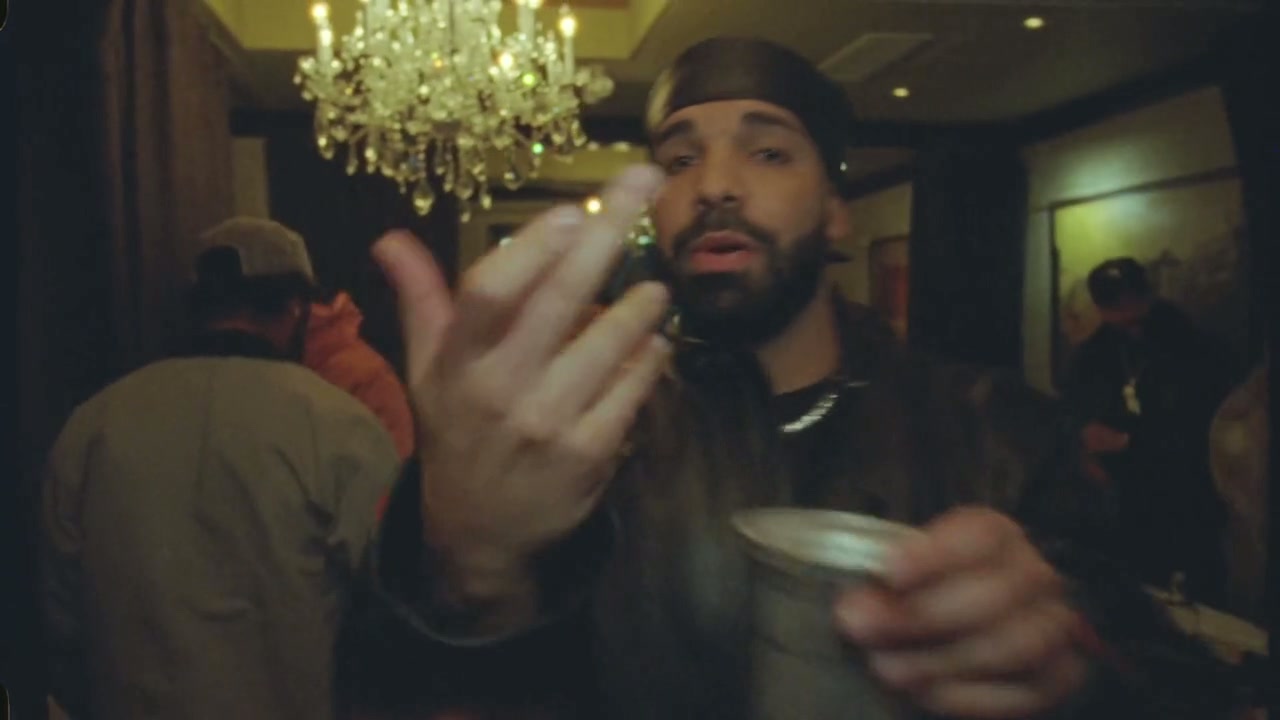
One take, cut into 2 lengths. The reference clip's own length is the length of the run, so there is a short one for the punchline and a long one for the whole sequence.
The clip keeps the room and the performance. Your photo decides who is in it. Everything in the left column is read from the reference video; the right column is read from your one image.
One identity, stated once, applied for the whole take. A run that is handed a face in two places averages them and gives you somebody who is neither.
One take, one gesture, and two ways to use it. You can put a different face into the video — same room, same beat, somebody else holding the cup — or have a model build a party of its own around a photo, which looks like this trend right up until the two are side by side. The panel above does the first. The last card is the second, made with another tool, so the difference is something you can see rather than something this page asserts.
The video all of it comes from is the card beside this text: the release itself, served by YouTube rather than re-hosted here, so you can check the claim this page makes about its own reference clip.
Nothing here sends you to a workbench to finish the job.
A clear, well-lit portrait of one person, previewed on this page. Nothing is uploaded until you are signed in — the panel keeps it locally until then.
The clip ships in two cuts of the video: 8 seconds from the point to the cup, 15 with the walk through the room in front of them. The cut's own length is the length of the run, because the model reads the motion from the whole clip.
Keep or rewrite the instruction, choose the resolution, then generate. The clip plays below the panel; reloading clears it, and the run stays in your video history.
Counted over the model this page runs, not over the whole catalog.
One photo, one reference clip. Generate stays closed until the photo is in, and the clip is always in play — it is where the room, the crowd and the timing come from.
The clip ships in 2 cuts of one take, and a run uses the cut's own length — so the length is chosen with the cut rather than on a slider. The models here would allow up to 30 seconds; a single generation is the finished shot, because the panel does not stitch or edit.
Each model declares its own tiers and the panel offers exactly those. The cost is shown before you press generate, and the shape is fixed at 16:9 by the clip.
The clip you run is silent, and the record the trend rides on is added where you post.
The trend is young enough that the names have not settled, and two of them describe different products. Here is the short version of each, so you can tell what you are looking at before you press anything.
One photo, one take, and the clip plays on this page a couple of minutes later. Every run is kept in your video history, where you can download it, add the sound and post it.